AICOMP INDUSTRY SUITE

Packaging ERP Software for Manufacturers

Aicomp leverages its extensive customer project experience to develop preconfigured software solutions. Customers enjoy personalized combination options and swift, secure implementation approaches.

Packaging ERP Software_Packaging Industry

What a Packaging ERP Has to Do

A standard ERP knows items, bills of material and routings. A packaging order describes different things. In corrugated these are board grades and sheet sizes, in folding carton board grades and print variants. In flexible packaging they are recipes and layer structure, in board and paper fiber furnish and reel and sheet formats. These values only appear in product configuration. Rebuild them afterwards in the standard, and you maintain variants instead of products. A packaging ERP needs eight functions for this: main machine planning, converting planning, grade and recipe management, material and reel stock, reporting on trim waste and set-up waste, costing, post-calculation and load planning. Before any ERP project, check which of them your standard covers. Ask your vendor for one order that runs from product configuration through production to post-calculation.

Planning at the machine

Every segment has one main machine that sets the pace. In corrugated that is the corrugator, in flexible packaging the extruder, in board and paper the paper machine. Folding carton makers usually buy in their board, so their planning starts at the press. Main machine planning holds grades, widths and capacity in one model. Converting planning follows on from it. Depending on the segment, it covers printing, die cutting, folding and gluing, laminating and bag making, or slitting reels and cutting sheets. Both plans use the same product data. If the data sits apart, the sequence ends up in spreadsheets next to the system. Ask for one shared data set for both plans.

Material and stock

Grade and recipe management describes what a product is made of. That means board grades with their test values, the layer structure of a film or the fiber furnish of a paper. Material and reel stock holds grades, widths and grammages. It also holds consumption per order. Trim waste and set-up waste belong in the same report. For sheet goods, trim depends on how the blanks are laid out. For reel goods, it depends on how the widths are split. Without that report, scrap stays a residual figure in the monthly accounts. Ask to see trim waste and set-up waste per order.

Price and result

Costing calculates product cost and sales price. The basis is the product configuration, not a price list. Post-calculation then compares actual consumption against plan. It separates material cost, labor cost and machine cost. In board and paper, energy consumption comes in as a separate figure. Without that comparison, margin per order stays an assumption. Ask for post-calculation built on the data behind the quote.

Delivery

Load planning assigns pallets and shipping units to the order. It sets the number of pieces per layer and stack and the number of pallets per truck. That decides freight cost. The decision belongs in the quote, not at the loading bay. Tie load planning to the product configuration.

EXPERIENCE INNOVATION

5 Key Features of Our Solutions

Core ERP

Benefit from stable and reliable ERP software platforms for your business processes that are proven for your needs.

Configuration Engine

Our configuration solutions inside the ERP system optimize CPQ (Configure Price Quote) processes essentially.

Preconfigured Processes

Thanks to comprehensive industry know-how, important processes and configurations are already prepared.

Standardized Interfaces

Standardized interfaces and integrations with industry-specific partners create error-free end-to-end processes.

Extend to the Max

Keeping an ear to the market, we are constantly developing new applications to make companies even more efficient.

Explore Our Tailored Industry Solutions

Over two decades of groundbreaking innovations in various industries have enabled companies to enhance their operations significantly. Discover how our tailored industry solutions can empower your business transformation.

Aicomp Industry ERP for Corrugated Board Packaging

Corrugated Board

The preconfigured solution for corrugated packaging covers all essential business processes, from simple sheet production to intricate FEFCO standard cartons and complex POS displays.
Aicomp Industry ERP for Folding Carton

Folding Carton

The preconfigured solution for folding cartons covers essential business processes, catering to the production of ECMA standard products as well as multi-part items with intricate CAD designs.

Aicomp Industry ERP for Flexible Packaging & Foil Manufacturers

Flexible Packaging

The preconfigured solution for flexible packaging assists in all pertinent business processes, from producing basic films to intricate bag manufacturing, including recipe management.
Aicomp Industry ERP for Paper and Board

Board & Paper

The board & paper industry-specific solution supports vital business processes for pulp and paper reel and sheet production, encompassing comprehensive recipe and consumption management.


Why Choose Us

Faster Implementation

Preconfigured processes as well as product & production data paired with an absolute industry focus create clarity in every project step.

Cost-Effectiveness

You get what you need - our industry-experienced consultants and developers ensure the right solution for your company.

Verified Industry Impact

Successful projects over more than 20 years form the solid foundation for our ERP software solutions. Ask our customers for feedback.

Streamlined Processes

Working at eye level with our customers and the will for automation enables efficient workflows for improved productivity.

Trusted By

An excerpt of our customers who rely on our industry-specific software solutions.

Customer Testimonials

“We focused on our people, our processes and our technology and how do we transform our company to become fit for growth. Aicomp has been an outstanding partner with us on our journey as we've really evaluated and changed our business to adapt to the speed of retail, and our customers changing and evolving needs.”
Michael Riegsecker_Menasha
Michael Riegsecker
President / Menasha Packaging
“Harmonization and standardization can be achieved by implementing a solid ERP solution. Due to the variety of processes in use, the coverage by SAP was best. This is topped by industry solution MILL as well as industry expertise and coverage delivered by Aicomp.”
Udo Nachbaur, Rondo Ganahl AG
Udo Nachbaur
CTO / Rondo Ganahl AG

SIMPLIFY AND ACCELERATE

Industry Suite Standard Functionality

Alternate Units

Products can be sold and handled in different units of measure. With “alternate units”, you can define which units are to be considered and how they are calculated. If one of the units cannot be calculated due to missing data, this unit is hidden.

Configuration Booster

For frequently recurring products, a template can be created for this product with all the necessary product specifications or even just parts of the specification, which can then be quickly used for a new product configuration.

Conversion Steps

Predefined conversion steps (refining processes) are a core feature of our industry solutions, ensuring efficiency across key processes. If a tailored industry solution isn’t yet available, we’ll work closely with you to seamlessly integrate the necessary conversion steps into the system, delivering a solution that meets your unique production needs.

Cross Plant

Enables the cross-plant production of semi-finished products or production steps that are recorded as one product for the customer in the order. This means that individual production steps or individual parts do not have to be divided into different quotations.

Document Manager

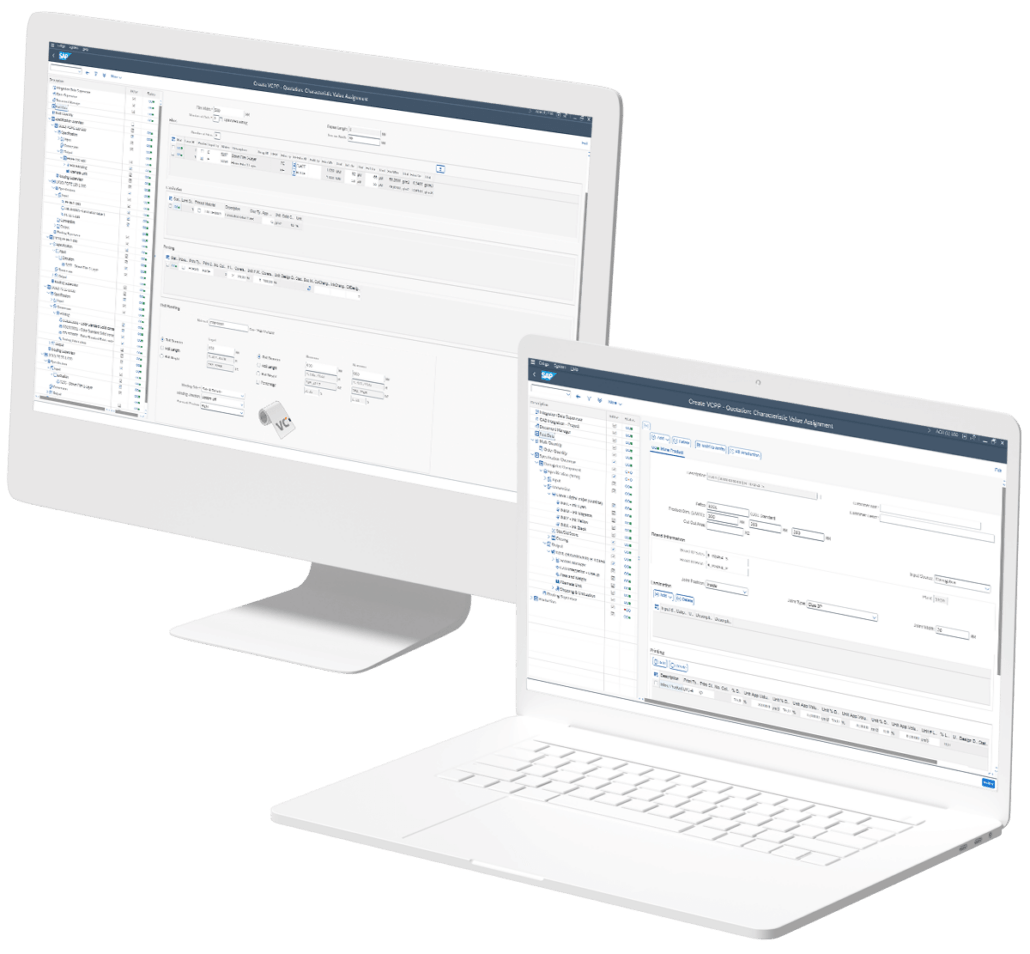
You have the possibility to add documents to a configuration using SAP Standard Functionality of Documents (SAP DMS). In an overview you can see the data Document Type, Document Part, Document Number, Document Version, Document Description, Document Files, Status, In Use.

Dummy Materials

Dummy materials support the product configuration of previously unknown components (raw materials). Dummy materials are used during the quotation process and are replaced by actual procurement materials before processing a sales order.

Fast Data Entry

The fast data entry supports you to create faster specification of configurations. The fast data screen doesn’t support the full scope and complexity of configuration but concentrates on the most common scenarios.

Industry-Specific Product Styles

Industry-specific product styles are configured with product-related settings. These can be used during product configuration and are used to determine the quantities of raw materials or the size of semi-finished goods for production.

Machine & Routing Customizing

Machine and routing functions are orchestrated by categorizing machines into types based on their common capabilities. Defined thresholds determine the potential tasks that each machine type can handle. Production Routes then dictate the sequence of production steps, ensuring that each process step is equipped with the necessary tools and constraints for efficient operation.

Master Data Generation by Quote

You configure your products from customer inquiries in our product configurators and can, for example, have a large amount of data automatically created in the ERP after the order is received. Various activities can be set up with a variety of products ranging from a simple material creation with pricing conditions to the creation of inspection types and the assignment to inspection plans as well as packing instructions. For procurement materials the Purchasing Info Record as well as the Purchasing Source List can be created.

Material Workbench

The material workbench is used for consolidated material maintenance in an industry and use-case specific overview. Individual materials that are assigned to a configuration can be edited here. Various industry-relevant scenarios, such as the maintenance of purchased materials or recipe management (e.g. for films) are available in the material workbench.

Multi Quantity

Effortless management of scale quantities, synchronized with identical product specifications but individually calculated production costs. The quantity in the offer can be compared with other open quantities or predefined quantities, such as a full truckload.

Open Supervisor

The Open Supervisor supports the creation of new configurations based on existing configurations, similar to a duplicate check, in which only later processing steps are to be changed. You can either copy a finished goods configuration or replace a procurement material and resolve the conversion steps defined in the configured procurement material master.

Print Customizing

With Print Customization you can define the basic information for printing. This includes print type, technology (analog, digital), marking types and if adapters/print cylinders are allowed. Additionally, you can assign the allowed ink types per print as well as the position of the ink. In this customizing also available color codes (including L*a*b* information) are defined.

Separation

Separation supports the production process of more than one product from one sheet that will be separated afterwards for individual production steps. This can be a different product based on the design, print, or a combination of both.

Shipping & Unitization

Shipping & Unitization allows you to manage all the information you need (e.g. dimensions, limits) for packing and positioning your finished goods on pallets and preparing them for shipping, including the consumption of packaging material and label information.

Specification Overview

The production of some products is very complex, due to the high number of SFGs and parallel sequences. To support the user during the configuration a graphical representation of the full product structure including its SFG components is provided.

CHOOSE YOUR SYSTEM ARCHITECTURE

Aicomp Industry Suite Adapts to Your Unique Needs

Discover the dynamic landscape of Aicomp Industry Suite options – on-premise, private cloud, and public cloud. 

Choosing between on-premise, private cloud, or public cloud ERP deployment depends on various factors, including the organization’s preferences, budget, security requirements, and scalability needs. Some organizations may even opt for a hybrid approach, combining elements of different deployment models to meet their specific requirements.

Tailor your ERP experience for success.

On-Premise & Private Cloud with Aicomp's Industry Solution

Advantages

  1. Full Development and Experience: Aicomp’s industry solution, fully developed for On-Premise and Private Cloud, brings the benefit of two decades of continuous development and experience in addressing the unique needs of paper and packaging manufacturers.
  2. Comprehensive Software: Customers benefit from a mature and comprehensive software solution that supports every intricate detail required by the paper and packaging industry.
  3. Customization Capabilities: Both On-Premise and Private Cloud deployments allow organizations to fully leverage the depth of Aicomp’s industry solution, with extensive customization capabilities to tailor the software to specific business requirements.
  4. Data Control: With On-Premise deployments, organizations have direct control over their data, addressing concerns related to data privacy and security in the packaging industry.

Disadvantages

  1. Higher Upfront Costs: On-Premise solutions may still involve higher upfront costs compared to cloud alternatives due to hardware and infrastructure investments.
  2. Scalability Challenges (On-Premise): Scaling infrastructure in an On-Premise environment may pose challenges and may not be as agile as cloud-based alternatives.

Public Cloud Environment with Aicomp's Industry Solution

Advantages

  1. Best-Practice Approach: Aicomp’s Public Cloud offering follows a best-practice approach, providing customers with a standardized and optimized solution based on industry best practices. You benefit from Aicomp’s consulting and development experience from numerous projects.
  2. Continuous Updates and Functionality: Public Cloud customers benefit from continuous updates and improvements, receiving additional functionality with each update to stay aligned with evolving industry standards and practices.
  3. Consistent Functionality: In a multi-tenant environment, all customers share the same set of functionalities, ensuring consistency across the user base and simplifying support and maintenance.
  4. Cost-Efficiency: Public Cloud deployments typically involve lower upfront costs, making the solution more cost-efficient for organizations looking to adopt Aicomp’s industry solution.

Disadvantages

  1. Limited Customization: While best practices are implemented, the level of customization may be limited in a Public Cloud environment, potentially restricting organizations with highly specific requirements.
  2. Dependency on Provider Updates: Organizations depend on Aicomp’s updates for new features and functionalities, which may not align with immediate individual business needs.